
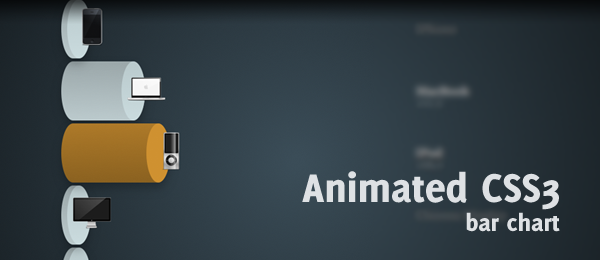
Do you remember the Wicked CSS3 3d bar chart that I placed online a couple of weeks ago? Paul Irish left a comment, requesting for an example with transitions. My reply was that I was already working on that, and today I’m proud to release the animated wicked CSS3 3d bar chart.
The principle is the same as the previous version: Create a beautiful 3d bar chart. But this time, we don’t create a "stacked" one (since animation would be hard), but several bars placed under each other. When hovering, the animation shows and the bar will grow to the appropriate size.
One of the neatest things of this example (in my opinion), is that it uses the exact same HTML (except for the title) as the original article (wicked CSS3 3d bar chart). It’s a great example to show what you can do with flexible CSS; You can create a totally different page with the same HTML and using only a different style sheet file.
Take note that this example only works in -webkit based browsers (Safari and Chrome), because those are the browsers that currently only support CSS3 animation (The next version of Firefox will support animations too). So, once again, this example is just a sneak peak into some awesome stuff CSS3 can do for us.
Video
Here’s an example of the page showed in Safari (4.0). It shows all the effects as they should should (rounded corners, gradients, shadow, rgba etc.), but most importantly: The animations.
I guess I warmed you up on how you could create something like this yourself, haven’t I? Let’s take a look under the hood.
HTML
Like I said, we’re going to use the exact same same HTML structure as with the wicked CSS3 3d bar chart.
<ul id="bar">
   <li id="iphone">
      <div class="top">
         <img src="images/iphone.png" alt="iPhone" />
      </div>
      <div class="bottom">
         <div class="infobox">
            <h3>iPhone</h3>
            <p>80,1</p>
         </div>
      </div>
   </li>
   <!-- More bar chart items -->
</ul>
As you can see, we’re simply using an unordered list that contains several items (the bars). Each bar contains from two segments: The Top and the Bottom. We’ll use the magic of CSS to style the top (which also contains the image) to an ellipse (top of the bar). The bottom (the bar body), that contains the info of the bar, will be styled to have a pretty rounded border too.
Now on to the more interesting stuff: The CSS(3) we need in order to create this neat effect.
CSS
The .top and .bottom classes are almost identical to the previous version (check out that tutorial to see how those were created). The only difference is that we now need to rotate the ellipse, since the bars are rotated too. Check out the most important changes:
#bar li div.top { float:left; margin-left:10px;
   width:40px; height:100px; -moz-border-radius: 40px/100px; -webkit-border-radius: 40px 100px; border-radius: 40px/100px;
   -webkit-transition-property: margin-left;
   -webkit-transition-duration: 500ms;
}

#bar li div.bottom { width:50px;
   height:100px; -moz-border-radius: 40px/100px; -webkit-border-radius: 40px 100px; border-radius: 40px/100px;
   -webkit-transition-property: width;
   -webkit-transition-duration: 500ms;
}
The .top class has a transition-property set to margin-left, since it’ll need to move to the right when hovering. The .bottom class has a transition-property set to width, since it needs to expand/grow when hovering. The duration is both set to 500ms, but that can easily be changed.
Now we need to specify the new values for each product individually. Here’s an example for the iPhone:
#iphone:hover div.top {
   margin-left:160px;
}

#iphone:hover div.bottom {
   width:200px;
}
Because the transition-property have been set to act to the specified properties, the animation works as expected. The .top will move to the right, and the .bottom will expand/grown in width. Because of this syntax, other browsers like Firefox will show the expansion too, but without the animation.
This is actually the most important change when compared to the previous version. Yet, there’s one neat animation in the text (.infobox) that I would like to show too.
#bar li div.bottom div.infobox {
   -webkit-transition-property: color;
   -webkit-transition-duration: 500ms;
}

#bar li:hover div.bottom div.infobox {
   color:#eee;
}

#bar li div.bottom div.infobox p {
   opacity: 0;
   -webkit-transition-property: opacity;
   -webkit-transition-duration: 500ms;
}

#bar li:hover div.bottom div.infobox p {
   opacity:1;
}
The .infobox has a title and a paragraph with a number. The infobox will slowly fade to another font color, and the paragraph with a number will slowly fade in by changing the opacity from 0 to 1. These are the small things that give the design that little bit extra.
Those were the most important changes compared to the wicked CSS3 3d bar chart. Check out the CSS in the example/download to see the full CSS.
Conclusion and Download
Just like with the previous example, this one only works in certain browsers. Yet, it’s a pretty cool example to see what CSS3 (animations) can do. Just for the record, Yes, you can create this effect using jQuery too. Yet, I wanted to keep this a full CSS solution, so that’s why I used the transition for this effect.
What do you think of this technique? What else would you like to see in this CSS? Feel free to share your thoughts!