Placed in: Home arrow Programming arrow CSS arrow Display social icons in a beautiful way using CSS3
Display social icons in a beautiful way using CSS3

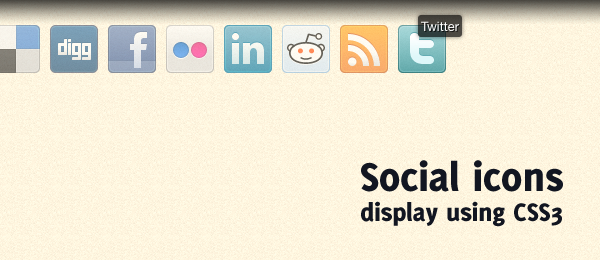
Although I didn't like CSS animations at first, the more I work with it, the more I do like the way it's implemented. A couple of days ago, I visited a website called Pubwich. The overall design of the website looks pretty good, but the part with the social media buttons attracted me even more. When you hover a icon, a small tooltip is displayed with the name of the social media. All other icons have a low opacity.

I wanted to take this concept and bring it to the next level using CSS3 transitions. The goal was to slowly fade-in and fade-out the opacity changing, and animate the position of the tooltip a little bit. With that in mind, I was able to create a beautiful social media icons display using CSS3.

Display social icons in a beautiful way using CSS3

The example works with all -webkit based browsers (Safari and Chrome), but also in Firefox 4. I've included a jQuery version as well, to be used as a form of "backward compatibility". You can also see how the same effect can be achieved using CSS and jQuery.

Demo Social icons CSS3 animations   Download Social icons CSS3 animations

Although the code and effect is very minimal, it'll give your website a very professional look. Let's dive into the code to see how you can implement something like this on your own website. Take not this effect can be applied to more buttons as well, not only social media icons.

HTML

Our HTML, the backbone of the page, will be very clean and simple (as it should be). Here's a piece of HTML we're going to use.

 
<ul class="social">
   <li class="delicious">
      <a href="http://www.delicious.com/">
         <strong>Delicious</strong>
      </a>
   </li>
   <li class="digg">
      <a href="http://digg.com/">
         <strong>Digg</strong>
      </a>
   </li>
   <!-- More services -->
</ul>

As you can see, we use a simply unordered list with list items that contains the links. The only "strange"e; party would be the use of the strong-elements. We need this extra element for some CSS styling of the tooltip. A span-element could be used as well, but I prefer the strong one in this case.

Now let's dive into some generic CSS classes both examples (CSS3 and jQuery) need.

CSS

The basic CSS isn't that hard either. We'll display the list in a row and change some display properties. This is the core of the generic CSS:

 
.social { list-style:none; }
.social li { display:inline; float:left; }
.social li a { display:block; width:48px; height:48px; position:relative; }
.social li a strong { position:absolute; left:20px; top:-1px;
   text-shadow:1px 1px 0 rgba(0, 0, 0, 0.75); background-color:rgba(0, 0, 0, 0.7);
   border-radius:3px; box-shadow: 0 0 5px rgba(0, 0, 0, 0.5);
}
 
li.delicious { background-image:url("../images/delicious.png"); }
li.digg { background-image:url("../images/digg.png"); }

Take note the text-shadow, rgba and border-radius are actually CSS3 properties, but I used them here as well (display of the tooltip). Since the parent of the strong element has a position:relative, we can position:absolute it and use the left and top properties easily.

Now on to the more interesting parts: The CSS3 animation!

CSS3

You might expect some heavy CSS3 going on over here, but that's not true. The syntax of the CSS transition is actually that simply, that it doesn't take that much room! Check it out:

 
.social:hover li { opacity:0.2; }
 
.social li { transition-property: opacity; transition-duration: 500ms; }
.social li a strong { opacity:0;
 transition-property: opacity, top; transition-duration: 300ms;
}
 
.social li:hover { opacity:1; }
.social li:hover a strong { opacity:1; top:-10px; }

We simply target a property that should be included in the animation. In our case, that's opacity (for the icon) and opacity, top (for the tooltip). We also set the duration of the animation.

When hovering, we change the values of these properties. Since the transition-property has been set, the browser does all the animation for us! It's as simple as that. When we "hover-out", the classes will be reverted again and the animation can be seen as well.

jQuery

In this case, jQuery can do the job as well (just in case a visitor comes to your website with a browser that doesn't support the CSS3 transition). Although the effect is the same, we do need a lot more code and the jQuery library to be imported. Here's the jQuery code I came up with:

 
// Hide all the tooltips
$("#jquery li").each(function() {
   $("a strong", this).css("opacity", "0");
});
  
$("#jquery li").hover(function() { // Mouse over
   $(this)
      .stop().fadeTo(500, 1)
      .siblings().stop().fadeTo(500, 0.2);
        
   $("a strong", this)
      .stop()
      .animate({
         opacity: 1,
         top: "-10px"
      }, 300);
     
}, function() { // Mouse out
   $(this)
      .stop().fadeTo(500, 1)
      .siblings().stop().fadeTo(500, 1);
     
   $("a strong", this)
      .stop()
      .animate({
         opacity: 0,
         top: "-1px"
      }, 300);
});

Now all your visitors will be able to see these social icons the beautiful way!

Conclusion and Download

I do think that this effect is an improvement compared to the original from Pubwich. Although the effect is minimal, it looks really good. Take note the actual demo contains some -webkit and -moz prefixes that are not included in the article. Dive into the code and see how the full CSS looks like! The same counts for the use of some ID's in the HTML, that are referenced by the HTML/JavaScript.

Demo Social icons CSS3 animations   Download Social icons CSS3 animations

Overall, I really do like the CSS3 transitions in this example. It's very short, clear and works perfect. You also don't need to import a huge JavaScript library, and it works when the user is browser with JavaScript off.

What do you think of this example? Would you improve the code somewhere? Or don't you like the CSS3 animations at all, and you would still stick with jQuery? Please share!

Tags:  css3 animation jquery social icons tutorial

Interested in this topic? You might enjoy another article I've written called

Did you like this article? Subscribe to my feed or email to keep updated on new articles.

Spread the word and submit to:
Digg!Reddit!Del.icio.us!Facebook!StumbleUpon!
Comments
Add NewSearchRSS
Catherine Azzarello   2010-10-25 15:13:58
Gravatar image Don't you just LOVE CSS3? I used CSS3 transitions on my site's social icons, too. But now I want to include the link name on hover like this.

Thanks!
Marco - Great!   2010-10-25 16:53:48
Gravatar image I'm glad you liked the script Catherine! Like the way you used the CSS3 on your website, but this kind of "hover" effect could be applied just as easily ;).

Yup, CSS3 is absolutly great! Thanks for your comment!
Elliott Saille - YES   2010-11-29 15:09:46
Gravatar image YES... YES i do. for a while i had a menu with css3 hover animations. i will dig up a pic and post :!:
Elliott Saille - Pics   2010-11-29 15:44:45
Gravatar image Normal
Posted image
http://imm.io/2ikH

Effect is achieved with the <mark> tag
Posted image
http://imm.io/2ikO
childmonster   2010-10-25 15:32:36
Gravatar image Great ! Thanks a lot :cheer:
Giacomo Colddesign - Great   2010-10-25 16:37:31
Gravatar image Really great article... it shows very well the power of Css3!!
Patricia Web   2010-10-25 17:56:44
Gravatar image great elegant solution with the social media icons, Im fooling around with it now to use as a regular navigation. The jquery backup is useful also, thank you.
cooljaz124   2010-10-25 21:07:52
Gravatar image Love it !

But, I have a question. Isn't it really easy to do the same with jQuery than CSS3 ? As for implementing on projects, what do you prefer - just CSS3 or jQuery based - as atleast for another 5 or 10 years until clients will ask for IE support :)
Marco - You're right!   2010-10-26 07:21:32
Gravatar image Hi cooljaz124! You're absolutely right - the jQuery solution is far more browser compatible (and will stay that way), but like I said in the article, you'll be dependent of the jQuery library. More bandwidth, slower pages, JavaScript turned off etc. could prevent you using that approach.

So, I do prefer the CSS3 way (it's simple, clean and elegant), but still for cross-browser's sake, you should go for the jQuery solution.

On the other hand > Try viewing the demo page using Firefox 3.6 . It still looks "Ok", you only don't see the animations ;) .
cooljaz124   2010-10-26 08:14:31
Gravatar image Thats nice.

I have checked it in Firfox 3.6.11 now and the effect is still there - but without animation.

But sure, I'm going to check it out on my latest project. Thanks again !
Adrian   2010-10-25 21:11:21
Gravatar image Great tutorial, thanks for sharing it.
shqip - Chat Shqip   2010-10-28 07:50:13
Gravatar image Great effects but i have some errorrs integrating this plugin in a smarty template engine driven website
lorro - IE   2010-11-02 20:14:22
Gravatar image thanks for this nice tutorial, it's very useful. Have implemented this on my own website as well.

Only one remark: this looks quite rubbish in IE8 :)
the hover overlay isn't hidden + the dark background isn't shown (so you just see all anchors, white text)
Kenneth - Kenneth's InspireLight.net: Photography from the   2010-11-23 15:18:12
Gravatar image Confirmed that both don't degrade gracefully in MSIE8. I haven't looked into fixing it, but it surely must be possible to have at least one of the alternatives work in IE8.
Colin - Colin   2010-11-06 12:00:21
Gravatar image Thanks Marco,

This is a Awesome tutorial, I really think thats CSS3 at its best, very simple and a few lines of code

Colin
Remco   2010-11-11 15:13:43
Gravatar image It would be nice if you could add -o- prefixed transition properties. With those it work fine in Opera too :)
Elliott Saille - nice tip   2010-11-29 15:05:53
Gravatar image I will add it to my site when i implement :lol: :!: :lol: :!: :lol:
Amy - Very nice!   2010-11-23 15:55:21
Gravatar image Very nice. Thanks for sharing.
Caroline   2010-11-26 06:11:51
Gravatar image Awesome, great tutorial,I think its easy to work in CSS3, nice post thanks for elaborating it... :cheer:
Malcolm Gibb - Translation Services UK   2010-11-26 13:53:25
Gravatar image This is great! CSS3 is looking better every day, really need to update my knowledge in it though. The possibilities like this with CSS3 are endless though, no more bulky jquery slowing down our sites for simple transition effects! Great stuff! :)
Xactoknife - IE8   2010-11-28 03:46:36
Gravatar image Fails IE8--
Elliott Saille - Very Nice   2010-11-29 15:02:57
Gravatar image Thanks so much. I hope to be able to implement this in my site when i get some time. :cheer:

Very slick with the jQuery fall back to :lol:
Marc Buurke - Not just yet   2010-12-06 13:08:01
Gravatar image Great tutorial, just hope the world will update fast enough to get the best use out of this.
spotht   2010-12-11 13:38:47
Gravatar image Very helpful tutorial, thanx for sharing it!
Pieter - Thank you   2010-12-20 08:39:06
Gravatar image Very nice example, but what happens when you're not using any javascript and can't render CSS3?
(internet explorer and previous versions of Firefox?)

Is the css version still visible? I don't care if there's no FX's for those users, but I want to be sure they still see the buttons...
Jager - Cool   2011-03-22 19:32:14
Gravatar image 100% item. I also prefer css3. Loading speed is significantly reduced compared with javascript. And if we group the figures in the sprites ... That would be 110%:) Thanks.
ratesman   2011-04-14 23:07:05
Gravatar image Very helpful tutorial, thanx for sharing it! :cheer:
e11world - Great Script   2011-04-21 17:35:12
Gravatar image Hi this was very nice and useful.
I'm using it at http://adalatdance.com/demo.html#about.html
shruti iyer   2011-06-23 14:46:05
Gravatar image Very cool, best compared to other pugins available
Timbo White   2011-07-03 23:34:35
Gravatar image Thanks, this is neat. I'm using it on my site's header. I tweaked the position of the tooltip to be centered and underneath the icon.

Although I skipped the jQuery part. I'm already starting to disregard browsers that don't have basic CSS3 support.
Felix MC   2011-07-17 16:28:16
Gravatar image is there an upcoming Google+ icon? :D
Endy   2011-07-25 11:46:44
Gravatar image great post....
i want to using it with my own icon... :lol:
mary - Dsquared2 Hoodies   2011-08-06 02:11:47
Gravatar image
Kumar - Web Designer Dubai   2011-10-03 06:56:14
Gravatar image I love it. thanks for this great article
ITEP - ITEP   2011-11-25 14:30:23
Gravatar image exelent !
icons NICE !
Peter - GREAT!   2012-05-14 22:00:14
Gravatar image This is exactly what was I was trying to handle! Thank you a lot! <img src=ide:' />
Mike - Love It! now how to keep them centered?   2012-07-17 23:52:28
Gravatar image I love this effect and would love to be able to keep them centered but am not sure how i would achieve it. I have been playing around with it but everything i have tried seems to mess up the centered text i have listed below the social icon area (contact and copyright info) anyone know how i might do this?
ben 10   2012-10-29 08:07:41
Gravatar image Awesome, great tutorial,I think its easy to work in CSS3, nice post thanks for elaborating it... :cheer:
ramjith - beautiful   2012-12-03 09:46:40
Gravatar image thans it's very helpfull
ramjith   2012-12-03 09:47:56
Gravatar image Thans it's very helpfull :lol:
Ali   2012-12-18 01:34:08
Gravatar image Very nice example. Thanks for tutorial.
Vivek Nath.R   2013-01-14 18:09:06
Gravatar image This is uber cool
akhand   2013-01-15 06:03:35
Gravatar image Exelent ............!
sly - waou   2013-01-20 18:23:06
Gravatar image nice code, thx a lot!
rizky - faceblog   2013-01-25 21:20:52
Gravatar image icon are very cool :)
Chiron - Thanks!   2013-02-28 09:42:18
Gravatar image Thanks for the nice icons and CSS3 effects. Just added to my web site and more than happy with it. Good luck and keep the great work up!
Read more...
Name:
Email:
  Gravatar enabled.
Website:
Title:
UBBCode:
[b] [i] [u] [url] [quote] [code] [img] 
 
 
:angry::0:confused::cheer:B):evil::silly::dry::lol::kiss::D:pinch:
:(:shock::X:side::):P:unsure::woohoo::huh::whistle:;):s
:!::?::idea::arrow:
 
Security Image
Please input the anti-spam code that you can read in the image.
Unsubscribe from e-mail notifications.
 
< Prev   Next >
Subscribe

Subscribe to Marcofolio