Placed in: Home arrow Programming arrow Webdesign arrow The Polaroid Photo Viewer - Non-Full Screen
The Polaroid Photo Viewer - Non-Full Screen

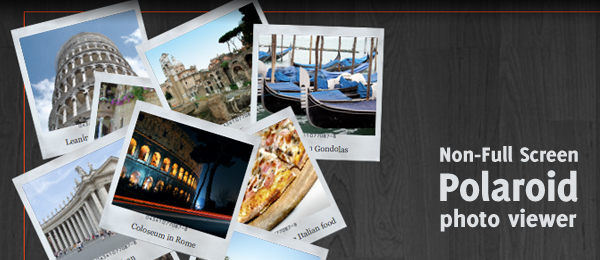
Pretty fast after I placed the Polaroid Photo Viewer with CSS3 and jQuery example online, I received loads of e-mails and comments requesting another feature. The original example was only full-screen, but people wanted it to "stick" to a box (Placing it inside a <div>).

By making a couple of changes to the original code, I managed to make this work too. So today, I present you the non-full screen version of the popular Polaroid Photo Viewer with CSS3 and jQuery.

The Polaroid Photo Viewer - Non-Full Screen

Try dragging the polaroids around in the demo. You'll be able to do so, but the surrounding division seems to prevent the user from actually dragging it outside it's container.

Demo The Polaroid Photo Viewer - Non-Full Screen   Download The Polaroid Photo Viewer - Non-Full Screen

Just like with the original example, this example only works on modern browsers supporting CSS3 (Safari, Chrome and Firefox 3.5). This probably would work with Opera too, but I haven't tested it.

Now to show you which small changes are made to the original script to make this one work.

First things first

Since we're not making the script full-screen anymore, we might want to trim down everything. This simply means:

  • Resizing all images (Polaroid background and foreground)
  • Trimming down the font-size in CSS
  • Changing some other static (yeah - it's a bad thing) values in the CSS

This will leave us with a simple, "minified-version" of the original script (just small polaroids). Now that's something we can work with.

HTML

So, let's do the most basic (but important!) step in the HTML. This is what we had at first.

 
<div class="polaroid">
  <img src="images/01_colosseum.png" alt="Colloseum" />
  <p>Coloseum in Rome</p>
</div>
<div class="polaroid">
  <img src="images/02_vatican.png" alt="Vatican" />
  <p>Vatican</p>
</div>
<!-- More images here -->

Since we'll need it to be locked to a surrounding container, this is the most obvious step to make:

 
<div id="polaroidcontainer">
  <div class="polaroid">
    <img src="images/01_colosseum.png" alt="Colloseum" />
    <p>Coloseum in Rome</p>
  </div>
  <div class="polaroid">
    <img src="images/02_vatican.png" alt="Vatican" />
    <p>Vatican</p>
  </div>
  <!-- More images here -->
</div>

And that's what we're going to work with (On the demo page, I added some extra information but that's not necessary)!

jQuery

Apart from the changes made in the first step (trimming everything down), we don't need to change the CSS; only jQuery. The following change is the most important one.

This was the original code:

 
// Make the polaroid draggable & display a shadow when dragging
$(".polaroid").draggable({
  cursor: 'crosshair',
  // More draggable stuff here
});

Now the following is added, which is vital to make the script work:

 
// Make the polaroid draggable & display a shadow when dragging
$(".polaroid").draggable({
  containment: 'parent',
  cursor: 'crosshair',
  // More draggable stuff here
});

Did you see the change? If not, this is added: containment: 'parent'. The containment is used to prevent the user from dragging the polaroids over the whole screen and keep it in the parent object (The div we added in the first step!).

That's it! There were some minor changes made to calculating the random placement (since we'll need to calculate that one based on the parent instead of the full screen), but that's just basic math.

Conclusion and Download

By doing some minor changes to the full script, you can actually create this effect and make it more usable. Luckily jQuery provides the containment for the draggable component, otherwise it would be really hard to create this effect.

Demo The Polaroid Photo Viewer - Non-Full Screen   Download The Polaroid Photo Viewer - Non-Full Screen

What do you think of the changes? Will you be able to use it in the nearby future?


Tags:  polaroid photo viewer css3 jquery webdevelopment

Interested in this topic? You might enjoy another article I've written called

Did you like this article? Subscribe to my feed or email to keep updated on new articles.

Spread the word and submit to:
Digg!Reddit!Del.icio.us!Facebook!Technorati!StumbleUpon!Newsvine!Furl!Ma.gnolia!
Comments
Add NewSearchRSS
Dax - not working with ie   2009-08-12 20:10:51
Gravatar image I'm using firefox of course but unfortunatly, it's not working with my IE 8
Marco - I'll check it out!   2009-08-13 02:11:51
Gravatar image I was already afraid of that - must admit that I haven't properly tested the script on IE since I'm currently working on a Mac.

I might give it a shot later to see what's going on with IE, stay tuned!
George - Looking forward on the IE fix.   2009-08-13 06:02:35
Gravatar image Hopefully this will work in IE as well.
Josh   2009-08-13 16:32:55
Gravatar image Thank You for answering my email and teaching us how to contain the polaroids. Keep up the good work!
Serhiy - re: I'll check it out!   2009-08-18 16:51:51
Gravatar image
Marco wrote:
I was already afraid of that - must admit that I haven't properly tested the script on IE since I'm currently working on a Mac.

I might give it a shot later to see what's going on with IE, stay tuned!


Just comment/remove this two lines:

'padding-left' : '-4px',
'padding-top' : '-4px',

and problem fixed. :lol:
Marco - Thanks!   2009-08-18 17:47:43
Gravatar image Whoah - that was it? I didn't had the time to fully check it, but thanks! Now this script is fully functional for everyboy - great work!
Pawan - Wow !!   2009-08-25 14:41:23
Gravatar image This is just coooooooooooooolllllllllllllllllll !!

Hope to use this in my personal website.

Thanks for developing and sharing such a great thing.

Pawan Pillai
India
Ronald - Thanks!   2009-08-31 10:47:09
Gravatar image Thanks a lot for this!
Definitely going to stay tuned for more, keep up the good work!

Ronald
Andy Schmitt - Thanks!   2009-08-31 16:30:28
Gravatar image Glad I found this, even if it was through line25.com's apparent approporiation... my site is a disaster ...this will be a start..thanks again..
Dan - Cool   2009-09-06 12:51:58
Gravatar image Wow! this has got a lot of potential. how does it perform in internet explorer?
leobugg - thanks for -4 padding tip   2009-09-28 17:42:16
Gravatar image i'm happy for the tip "-4 padding". It works now.
lanner - Excellent but...   2009-10-22 13:58:17
Gravatar image Hi, how to make the possibility to move or put behind the photo's ? cause everything are fixed and don't do anything (IE8)
thanks
Cause after that i want to put a lightbox for look in big size
Michael   2009-11-25 23:25:57
Gravatar image Well done!!!, but would it be possible to zoom into the pics with something like the fancybox jquery plugin http://fancybox.net/example?
Serhiy - re: Thanks!   2010-03-01 17:14:50
Gravatar image
Marco wrote:
Whoah - that was it? I didn't had the time to fully check it, but thanks! Now this script is fully functional for everyboy - great work!


Thank You Marco for awesome plugin. Finally I'm finish website and you can check it out at www.moscreative.com on portfolio page..... they looks great!!! Thank you again!
maria - Thanks a lot!   2010-03-15 23:03:43
Gravatar image Thank you Marco!

I really wanted to do this effect for a year when I designed my site, but I did not know how

Now my site is like I want.
you can see it here: http//www.mascruz.es

thanks, thanks, thanks :lol:
CThompson - Images load in wrong place   2010-03-24 13:58:03
Gravatar image Hi

Im working on http://www.rjt-online.com/2010%20Website/photos.php and the script works brilliantly.

The images need tweaking slightly.

However, the images always load at the very bottom of the div and they have to be dragged up to be able to see them.

Once they have been dragged up, it works, but when the page sloads it doesnt look so good.

Any help would be appreciated.
JJ - re: Images load in wrong place   2010-07-19 23:26:01
Gravatar image
CThompson wrote:
Hi

Im working on http://www.rjt-online.com/2010%20Website/photos.php and the script works brilliantly.

The images need tweaking slightly.

However, the images always load at the very bottom of the div and they have to be dragged up to be able to see them.

Once they have been dragged up, it works, but when the page sloads it doesnt look so good.

Any help would be appreciated.


Hi

I think there's a typo in the JS; it should read

var toppos = Math.random()*(wih - $(this).height()) + position.top;

and not

var toppos = Math.random()*(wih - position.top) + position.top;

Best

JJ
tokat nakliyat - tokat evden eve nakliyat   2010-08-14 10:45:25
Gravatar image good code thanks
Read more...
Name:
Email:
  Gravatar enabled.
Website:
Title:
UBBCode:
[b] [i] [u] [url] [quote] [code] [img] 
 
 
:angry::0:confused::cheer:B):evil::silly::dry::lol::kiss::D:pinch:
:(:shock::X:side::):P:unsure::woohoo::huh::whistle:;):s
:!::?::idea::arrow:
 
Unsubscribe from e-mail notifications.
 
< Prev   Next >
Subscribe

5304 readers subscribed here. Subscribe today!