Placed in: Home arrow Fun arrow Taking the plunge: Buying a MacBook Pro
Taking the plunge: Buying a MacBook Pro

Hi there people! Just a quick personal note from me. School is about to start over here in a couple of days and I was always stuck with a 3-and-a-half-year old 800 MHZ laptop. I think you can imagine that this was a bad thing for me, being a programmer / designer.

With lots of thinking and checking out resources if it'll benefit me, I decided to buy a MacBook Pro. Yesterday, I received my new laptop.

MacBook Pro

I've never worked with an Mac before, but I hear a lot of positive sounds about it. If you own a Mac, what do you think is one of the greatest features of the machine / OS? And if not, what's holding you back to buy one (Next to the ridiculous high price tag)?

Anyway, I'm pretty happy with my new laptop. I'm now able to work (a lot!) faster and this will probably mean more (web)design articles for you too! I'm already working on a new design for Marcofolio.net.

I made a few pictures from my MacBook Pro.

MacBook Pro

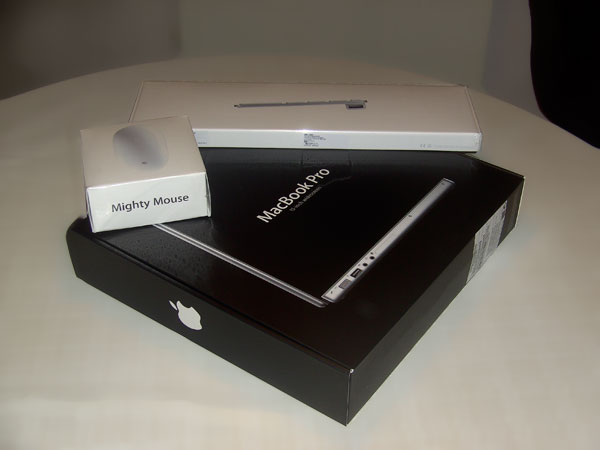
Whoohoo! UPS delivered the boxes.

MacBook Pro

As expected: Beautiful boxes containing the goods; The Mighty Mouse, the Apple keyboard and ofcourse: The Macoobk Pro.

MacBook Pro

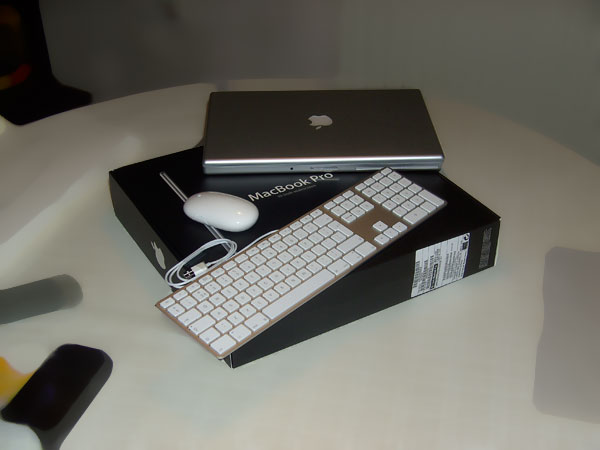
All things outside their boxes.

MacBook Pro

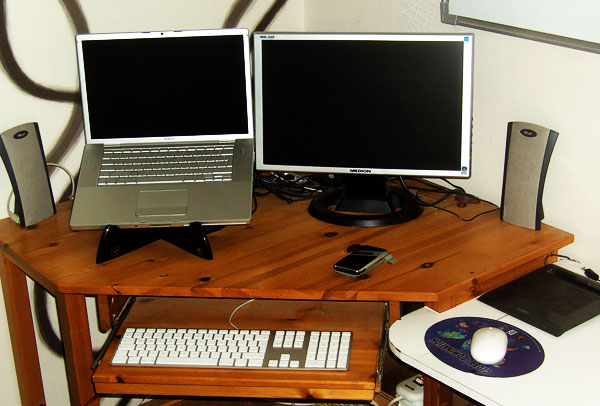
And there it is, my totally new setting. Maybe not as inspirational as other workspaces, but it's good enough for me. You can see my (old) 19" widescreen, iPhone and Wacom on the picture.


Tags:  mac apple macbook

Interested in this topic? You might enjoy another article I've written called

Did you like this article? Subscribe to my feed or email to keep updated on new articles.

Spread the word and submit to:
Reddit!Del.icio.us!Facebook!Technorati!StumbleUpon!Newsvine!Furl!Ma.gnolia!
Comments
Add NewSearchRSS
Oxide   2008-08-23 21:43:16
Gravatar image I started to work with Mac since nearly 10 years. I'll never go back on a windows system. You'll see, after "unlearning" all the stupid things windows is puting in our heads, things are so good that you'll ask yourself why you didn't switch before !!
:P
Marco - Wow!   2008-08-23 22:13:53
Gravatar image Wow, 10 years already?! You mean that you had one of the "oldskool" many-colored iMacs at home?

The thing that you're saying (about Mac OS being very "logical";) is one of the common things I hear about the system. I'll come back to this once I've used the system for a while ;)

Thanks for your comment!
Anonymous   2008-08-24 01:08:52
Gravatar image One more thing (!)... you'll probably never forget your first Mac. Welcome to the club. :)
redglassbowl   2008-08-24 00:45:07
Gravatar image to be completely honest, the greatest thing any mac has on any pc is the obvious elegance of the operating system. it looks great and if you've done even A LITTLE bit of research on macs, I'm certain you've heard the word 'seamless' several times. though it may get old it's very true. a mac works with itself and other macs better than any other computer out there. also the freeware for it is AMAZING! i've found several free design programs for games, graphics, applications, etc. don't worry... you'll love it.
Marco - Thanks!   2008-08-24 11:42:08
Gravatar image You're right: One of the reasons I (obviously) bought the machine was because of it's elegance.

I haven't downloaded anything (yet) for the OS: Do you have a website / application that you would recommand?

Thanks for your comment!

Greetings,
Marco
Oxide   2008-08-24 17:13:40
Gravatar image Things (http://www.culturedcode.com/things/) is wonderfull for organisation and work perfectly with iPhone.
Growl is perfect for events notification.
1password for keeping all you passwords, forms, credit cards.
Perian for quicktime to have more codec.
Adium for chating (MSN, ICQ...).
Coda or TexteMate for Web coding devs.
Transmission for torrents.
Newsfire or Netnewswire for Rss reading.
The list goes on and on !!

You'll see that those apps are wonderfull to work.
Marco - Thanks!   2008-08-24 17:46:06
Gravatar image Wow, nice list, thanks man! I'll try them out once I have time :) .

If you have more / "must-knows" / "must-haves", I'm all ears!

Greetings,,
me   2008-08-24 20:07:48
Gravatar image Please Explain...
You say "I'm now able to work (a lot!) faster". What exactly are you doing faster? I mean, your mouse isn't moving faster and you sure aren't typing any faster. So What is saving your time. Wich applications do you use? I'm just interested in you motivation. I am a mac user myself but hate all the people who buy mac just because it is cool.

Besides, why did you go pro instead of a normal macbook?
Marco   2008-08-24 20:36:40
Gravatar image Ah, you're right about that :) . Saving time is loading (and using) all the different applications: Photoshop, Dreamweaver etc., just compared with my old laptop.

I've done some research, but especially the OS seems to be more build for designing. I've seen the OS at a friends house before and just like Oxide told before, it's much more "natural" than Windows (although you'll need to get used to it).

Getting the pro version was because I wanted the "best one" as an investment: More RAM, GHZ etc. Secondly, the Pro one just looks (much) better (in my opinion) and 13.3" was too small.

Anyway, good questions!
Qbik   2008-11-01 16:22:50
Gravatar image hmm
I'm going to buy macbook (but new one) at the end of this month i need laptop smaller than 15'' so i choose macbook with 2,4 Ghz
Any advice or on what to pay attention?
Marco - Just buy!   2008-11-01 18:15:48
Gravatar image Well, that's one of the advantages of the MacBook: You don't have to pay attention to anything. Just think what you want to do with it (Loads of Photoshopping or just 'simple tasks' like text editing) could help you with the hardware configuration. Other than that, you won't actually need anything.

The "new generation" of MacBooks (sadly) came a little bit too late, but I really love the one that I have now ("older" generation ;) ).
Joel - My experiences as a Mac convert   2009-02-22 00:13:40
Gravatar image Hi Marco,

Welcome to the wonderful world of Macs. I'm sure by now you've probably had the chance to experience many of the wonderful features. I thought I'd share some of my own experiences, suggestions and list of reasons for switching to a Mac, having made the switch almost 2 years ago:

1. Taking screenshots on a Mac is a pleasure. At first I missed the print screen button but you can program a short cut to one of your function keys to perform this, but I find that cmnd+shift+4 and cmnd+shift+4+space is much more useful. You can actually take a screenshot of the exact area that you need, without having to crop it.

2. Mac's do not have a registry that keeps getting more and more clogged with junk. Windows systems all have registries which become so heavy that the machines slow down in time. Even Windows 7 will have a registry, so while it may seem fast now, it will also be slow after a few months of use.

3. PDF integration: PDF is so naturally integrated into the Mac. You can save anything as a PDF in a snap.

4. Web receipts: When doing online shopping, instead of printing the receipt, simply select "save as web receipt" in the print options (from the PDF combobox in the bottom left corner). It will save the receipt as a PDF in a folder called "web receipts" which is in the documents folder. You can then find it easily and it saves paper.

5. Archive and install: If your OS ever needs a reinstall, you can do a virtually clean install without losing your data and having to reinstall your apps by doing an "archive and install". It moves all your data to the side, performs a clean install of the OS, then moves it back. I've never seen Windows do this.

6. Apple care and genius bar: Need I say more? If you've ever used either of these, you'll know what I mean. What a pleasure to deal with them for after sales service. And, they actually know what they're talking about.

7. Application installation process: This process may seem a bit foreign coming from Windows as it's often more technical, whereby you often need to drag the application int the applications folder and then eject/unmount the installer, but it has advantages too: For one thing, you can actually install 2 versions of the same application without a problem. For example: I have Firefox 2 and 3 installed, simply by dragging both into the applications folder with one in a subfolder.

8. To uninstall an application, simply drag it to the trash. Could this be any easier?

9. Moving files: When you move files between folders on the same hard disk it happens instantly, even extremely large files. Of course, it's just changing the address of the file, but this is how it should be. Try do this on a windows machine and you'll see a progress bar while waiting for it to happen. I'm referring to moving, not copying.

10. Screen quality: The quality of the Mac monitors is far superior to any other screen that I've seen. I haven't seen Windows machines come close to it, unless you go for a really expensive monitor that you can't get in most stores. This already justifies the higher price for the Mac.

11. Cost: Mac's are not really much more expensive (if at all) in the long run. Once you take into account the annual software that you need to protect Windows machines and the expensive OS upgrade cost of Windows, it may actually work out cheaper to buy a Mac. It only costs US$129 to buy the Mac OS - and that's the full version. Also, you don't have to upgrade your hardware to upgrade your OS. Every version of Windows requires more expensive hardware and more memory. Mac OS updates will work even on machines that are several years old.

12. New OS every 18 months: There's usually a new OS released every 18 months - not every 6 years, keeping you up to date with the latest technology. Also, each OS is faster and the upcoming Snow Leopard is supposed to be super fast - which is quite the opposite to Windows updates. Sure, Microsoft may claim that Windows is faster with each OS, but that's only after you buy a faster CPU and double your memory in order to handle the new OS.

13. Enjoy the silence: My Mac is so quiet, I had to get a new UPS because the gentle hum of the little fan on the UPS disturbed the silence. Two years later, it's still super quiet.

14. If you ever need to shut an app down, you can press cmnd+option+esc and choose to "force quit" it. This is like ctrl-alt-delete on Windows but it really works and releases the memory that the app is taking by killing just that process and not crashing your whole machine, as Windows often does.

15. People who have Macs really love talking about them. They actually enjoy working on them. When do you hear Windows users talk about how much they love their computers?

16. A few of my recommended apps:

- Transmit - the best FTP app that I've used
- iWork '09 - the Apple equivalent of Office, but much cheaper and lighter and opens and saves in Office formats too. There's no need to put expensive heavy Office on your Mac.
- iPhoto - Worth using, in case if you haven't used it yet. It's free with your Mac - unless you upgrade to a new version.

17. Mac's just work - no hassle, and they're truly plug and play. When you plug in something to USB it finds it and makes it usable within seconds. Try do that with Windows while it waits... waits... looks for driver... waits... installs driver.... etc...


That's all my main points for now. I hope some of you find this beneficial. I don't know anyone who has made the switch and has regretted it.

Enjoy!!!

Joel
Marco - Thanks!   2009-02-22 10:24:13
Gravatar image Hi Joel,

Wow - That's one of the longest and most detailed comments ever placed here. It's almost a full article (if you want, you could convert it to an article so that it'll be placed as an article, just contact me ;) )!

About your points:
1) The superb screenshot function is lovely indeed! I was searching for the "Print Screen" at first too, when I found out the "Cmd +Shift + 4" functionality - Awesome! Also, "Cmd + Shift + 3" does work exactly the same as "Print Screen" on Windows (If you want to have the full screen).

4) Didn't know that functionality (yet)! I don't buy much stuff online, but that function could come in handy, thanks!

5) That's indeed one amazing thing about the Mac. I accidentally did a "CHMOD" on the wrong folder, making it impossible for OSX to get updates. Just popped in the OSX install disk, no hassle and everything worked fine again without losing my files.

10) Yup - Just like the iPhone, the screen quality of a Mac is amazing! Can't say anything about that :) .

13) Haha, awesome!

16) I'm using Transmit too, but I have to admit that I enjoy using FlashFXP (Windows only) a bit more. Other than that, Transmit is indeed the best FTP app for Mac out there!

17) Once again, you're right. I have 4 external USB drives, all connected to 1 HUB. Windows could only find 3 automatically and I had to do some real hard work to get the 4th one going. Mac: Popped it in, waited few seconds for Spotlight to index them and boom: It worked!

I also like the "multi-column" file browser. Took me a while to get used to it, but now that I am, I really love it!

I totally don't regret the change of buying a Mac - I don't see why anyone would ;).

Take care!

Greetings,
Marco
Joel   2009-02-23 08:01:26
Gravatar image I'm glad you liked my comments. Thanks for the offer to write an article for you - it's very flattering, however I'm already involved with another blog.
Read more...
Name:
Email:
  Gravatar enabled.
Website:
Title:
UBBCode:
[b] [i] [u] [url] [quote] [code] [img] 
 
 
:angry::0:confused::cheer:B):evil::silly::dry::lol::kiss::D:pinch:
:(:shock::X:side::):P:unsure::woohoo::huh::whistle:;):s
:!::?::idea::arrow:
 
Unsubscribe from e-mail notifications.
 
< Prev   Next >
Subscribe

About 2095 others will follow everything on Marcofolio.net.